EKS


EKS prerequisite
- create cluster
eksctl create cluster --name=petlover-back \
                      --region=ap-southeast-2 \
                      --zones=ap-southeast-2a,ap-southeast-2b \
                      --without-nodegroup
- create OIDC and node group (With '--approve' it will replace the service account with a new one)
eksctl utils associate-iam-oidc-provider \
    --region ap-southeast-2 \
    --cluster petlover-back \
    --approve
- create node group
- These add-ons will create the respective IAM policies for us automatically within our Node Group role.
# Create Public Node Group
eksctl create nodegroup --cluster=petlover-back \
                       --region=ap-southeast-2 \
                       --name=petlover-back-ng-public1 \
                       --node-type=t3.medium \
                       --nodes=2 \
                       --nodes-min=2 \
                       --nodes-max=4 \
                       --node-volume-size=20 \
                       --ssh-access \
                       --ssh-public-key=my_key \
                       --managed \
                       --asg-access \
                       --external-dns-access \
                       --full-ecr-access \
                       --appmesh-access \
                       --alb-ingress-access \
											 --node-private-networking # for private VPC
- delete group nodes
eksctl delete nodegroup --cluster=petlover --name=petlover-back-ng-public1

eksctl delete cluster petlover-back
- 如果不能访问到 aws eks?使用
- fix: aws eks update-kubeconfig --region region-code --name my-cluster
aws eks --region ap-southeast-2 update-kubeconfig --name petlover-uat
本地 call remote private ECR (Secret)
-
https://skryvets.com/blog/2021/03/15/kubernetes-pull-image-from-private-ecr-registry/
-
https://medium.com/@danieltse/pull-the-docker-image-from-aws-ecr-in-kubernetes-dc7280d74904
- 注意,这里的 namespace 可以用 default
- 注意本地环境变量
kubectl create secret docker-registry regcred \
--docker-server=[046381260578.dkr.ecr.ap-southeast-2.amazonaws.com](http://046381260578.dkr.ecr.ap-southeast-2.amazonaws.com/) \
--docker-username=AWS \
--docker-password=$(aws ecr get-login-password --region ap-southeast-2) \
--namespace=default
常见 key,regcred,用来储存 key (key 被放在 .dockerconfigjson 中)
-
获得当前 context:kubectl config current-context
- arn:aws:eks:ap-southeast-2:0463812XXXX:cluster/petlover-uat ← AWS cluster name
- Petlover-Prod ← Azure Aks cluster Name
-
minikube service <service-name> —url 启动本地 service 服务器
-
kubectl get secret regcred --output=yaml 输出新建的秘钥,以 yaml 格式
-
kubectl delete secret regcred 删除秘钥
-
sudo service docker start 启动 docker 服务器
-
echo -n ‘<加密内容>’ | base64 然后返贴回到 secret file 中
EKS EBS
- CSI: container storage interface
- EBS: elastic block storage (for persistent volumes); provides block level storage for use with EC2 & container instance
- EBS volumes exposed as storage volumes that persist independently from the life of the EC2 or container instance
- SC(storage class) 和 PV(persistence volume) is not namespace based
- PVC(persistence volume claim) 配合 SC,可以 dynamic assign storage。不需要提前购买 storage,然后开发(PVC)再去 claim 可获得的 storage
- 老版本的是,先购买 PV,再提出 PVC,再分配 storage
Demo
- add IAM policy(EC2 to access EBS) to node group and apply CSI driver: https://github.com/stacksimplify/aws-eks-kubernetes-masterclass/tree/master/04-EKS-Storage-with-EBS-ElasticBlockStore/04-01-Install-EBS-CSI-Driver
EKS Cluster
- EKS control plane (master node)
- is not shared across clusters or AWS account
- consists of at least two API server nodes and three ETCD nodes that run across three AZs within a region
- EKS handle unhealthy control plane instances, restarting them across the AZ within the region
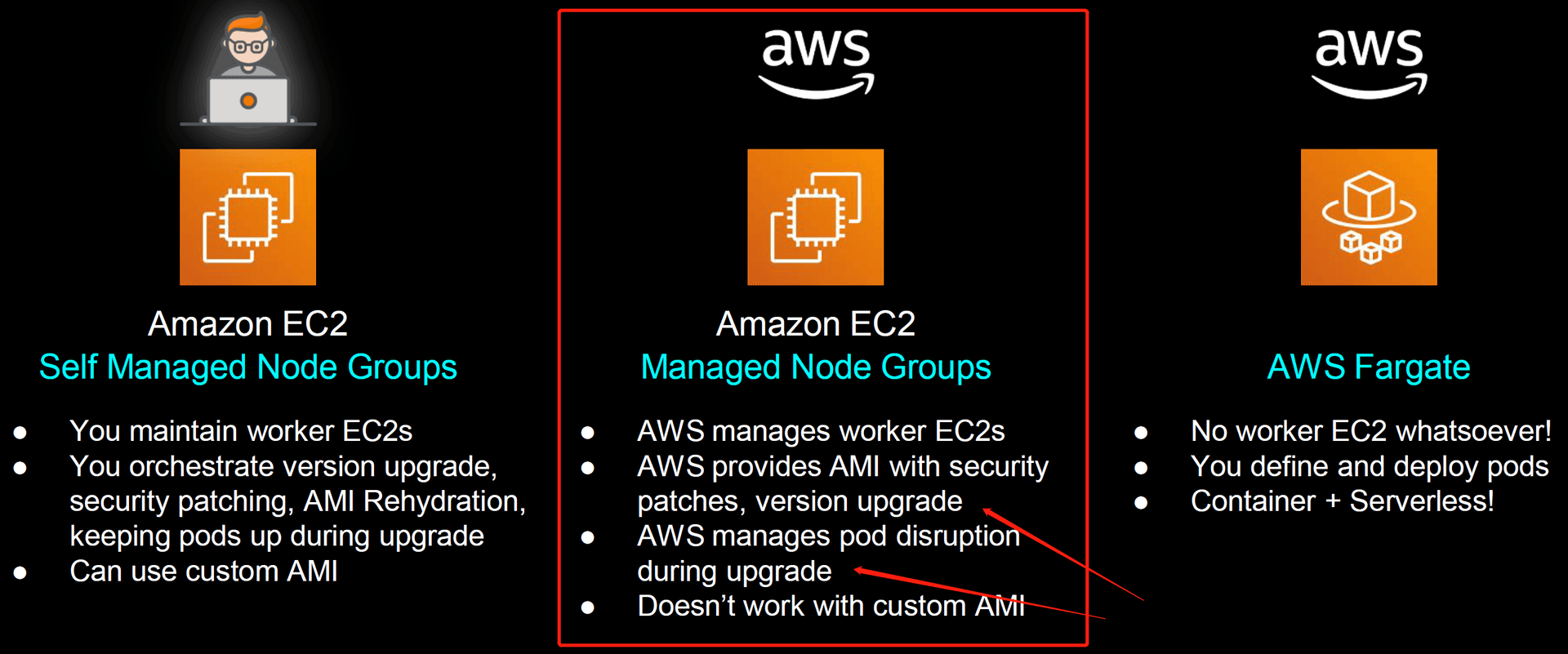
- worker nodes & node groups
- run to connect to our cluster’s control plane via the cluster API server endpoint
- more instances in the node group are deployed in an EC2 autoscaling group
- all instances in a group must be: the same instance type, running the same AMI and use the same worker node IAM role
- fargate profiles
- AWS specially built Fargate Controllers that recognize the pods belonging to fargate and schedule them on fargate profiles
- RBAC policies
- RBAC policies as authorized, 允许跨 cluster,aws accounts 访问
- OIDC: Open ID Connect provider
EKS eksctl

.png&w=1920&q=75)
.png&w=1920&q=75)
.png&w=1920&q=75)
- AMI update: master node 更新,没事,反正一直是 aws 自己管理的,我们看不出啥。。。 然后 slavor node 更新,我更新 ami,desired 原来是 4,然后直接给我拓展到了 10 个 实际运行的 node 还是 11 个。。。 可能 micro 不太行吧,顶不住。。。 不过 pod 一直是我稳定定义的 3 个,内部在 rolling update
- The Kubernetes Metrics Server: is an aggregator of resource usage data in your cluster. Server is commonly used by other Kubernetes add ons, such as the Horizontal Pod Autoscaler or the Kubernetes Dashboard
Security: RBAC, IRSA, ClusterRole, ClusterRoleBinding
RBAC: Role based access control
IRSA: IAM role service account
- Pod needs IAM role to implement AWS resource → pod lifecycle is short → k8s deployment can handle this but deployment is construct → IAM cannot in k8s construct → need cloud-specific construct → service account SA
- SA is in AWS EKS inside, it needs to verify with IAM by IAM OIDC Provider (Cluster Level)
.png&w=1920&q=75)
.png&w=1920&q=75)
- cluster role: grant cluster to access resources: eg. nodes, pods communicate; cluster roles is not namespace limited。 (相当于 aws 的 policy)
- SA 也是某种形式的 cluster role 因为其有权限操作 cluster 内部的资源,但是不能 create new pod eg. alb-ingress-controller
.png&w=1920&q=75)
.png&w=1920&q=75)
.png&w=1920&q=75)
- how to create cluster role and SA? 分别创建,然后 combined 在一起
- role vs cluster role?
- Role sets permission within a particular namespace (have to specify namespace) (what we say 当你定义 ns 的时候定义的 role,就是 role;所以是 namespace role)
- clusterRole is non-namespaced
- 给用户权限
.png&w=1920&q=75)
.png&w=1920&q=75)
Ingress Load balancer controller 1
ALB?
.png&w=1920&q=75)
.png&w=1920&q=75)
.png&w=1920&q=75)
.png&w=1920&q=75)
.png&w=1920&q=75)
- 在 k8s 内部,我们叫他 ingress service,在 aws 中,我们叫他 aws alb 但其实他们是等价的(equivalent),我们把他们称为一个 aws application load balancer object (single object)
.png&w=1920&q=75)
Ingress Load Balancer Controller 2
-
prerequisite: 安装 cluster + nodes group + OIDC provider
-
下载 iam policy JSON file
curl -o iam_policy_latest.json https://raw.githubusercontent.com/kubernetes-sigs/aws-load-balancer-controller/main/docs/install/iam_policy.json- 并创建 policy
aws iam create-policy \ --policy-name AWSLoadBalancerControllerIAMPolicy \ --policy-document file://iam_policy_latest.json- 记录 arn
- 创建 iam service account,绑定 policy 到 role 上
eksctl create iamserviceaccount \ --cluster=petlover-back \ --namespace=kube-system \ --name=aws-load-balancer-controller \ --attach-policy-arn=arn:aws:iam::046381260578:policy/AWSLoadBalancerControllerIAMPolicy \ --override-existing-serviceaccounts \ --approve- install aws LBC by Helm
helm install aws-load-balancer-controller eks/aws-load-balancer-controller \ -n kube-system \ --set clusterName=petlover-back \ --set serviceAccount.create=false \ --set serviceAccount.name=aws-load-balancer-controller // omit it now --set region=us-east-1 \ --set vpcId=vpc-0165a396e41e292a3 \ --set image.repository=602401143452.dkr.ecr.us-east-1.amazonaws.com/amazon/aws-load-balancer-controller- Optional useful command:
helm uninstall aws-load-balancer-controller -n kube-system -
Ingress class? 如果多个 ingress controller running in k8s cluster, how to identify to which ingress controller our Ingress resource? should be associated with? → K8s object type object —— need to associate with ALB ingress controller (定义在 k8s cluster 中,设置默认 controller)
-
controller deployment 里只有两个东西,一个是 metric server,一个是 webhook-server(由 controller service 暴露服务,进行触发)
.png&w=1920&q=75)