Jenkins


Jenkins VM server 安装流程整理 (之后用 Ansible 安装)
- 安装 VM Jenkins
- 更新 apt
- 安装 java 环境
- import the GPG key for the Jenkins repository
- add the Jenkins repository to the system
- Once the Jenkins repository is added and enabled, you can update the package list and install the latest version of Jenkins by typing
- apt install Jenkins: 'sudo apt install jenkins -y'
- check Jenkins status: 'systemctl status jenkins'
- 开通 8080 端口 (gcp 这里比较麻烦,要新建 port 在 gcp Firewalls,然后根据 tag 应用到(attach)到 gcp vm 上)
- 从 vm 中拷贝 key 'sudo cat /var/lib/jenkins/secrets/initialAdminPassword'
- sudo -i ⇒ root user ⇒ gpasswd -a jenkins root (将 jenkins 账号添加在 root 中)
- groups jenkins 应该显示 root
- visudo ⇒ add jenkins ALL=NOPASSWD:ALL 用户可以在不输入密码的情况下,jenkisn 可以使用系统级命令权限(eg. docker)
- 'sudo usermod -aG docker $USER' dial unix /var/run/docker.sock: connect: permission denied 解决办法,Jenkins docker 无权限运行 docker 的情况 (add jenkins to docker group) Linux,默认是 home/user 是默认路径目录,而 jenkins 的 home 目录是在 var/lib/jenkins,所以很多需要 jenkins 执行的命令,都需要安装在这个目录的名下,例如 github .ssh
- 切换到 jenkins 用户后,'ssh-keygen' 生成 github access key
- 用于主,nodes 联动
- ssh-keyscan -H ip-address >> /var/lib/jenkins/.ssh/known_hosts 省去 yes 的认证步骤, optional,,会把这条记录加到 known_hosts
- 把 public key 给 master,放到 authorized_keys 中 echo “content” >> ~/.ssh/authorized_keys
Jenkins 可以存储以下类型的 credentials:
- Secret text - API token 之类的 token (如 GitHub 个人访问 token)
- Username and password - 可以为独立的字段,也可以为冒号分隔的字符串:username:password(更多信息请参照 处理 credentials)
- Secret file - 保存在文件中的加密内容
- SSH Username with private key - SSH 公钥/私钥对
- Certificate - a PKCS#12 证书文件 和可选密码
- Docker Host Certificate Authentication credentials.
Jenkins Plugins Required
-
AnsiColor: coloring the Console Output
-
Blue Ocean:
-
pipeline: AWS steps
-
**CloudBees AWS Credentials: 存 access key 和 secret key 的**
-
CloudBees Docker AWS Credentials
-
Role-Based Authorization Strategy
-
Email Extension Plugin
-
docker
-
docker pipeline
-
Bitbucket Plugin
-
Slack Notification Plugin
-
Azure Credentials plugin
DevOps Jenkins 01

- Jenkins
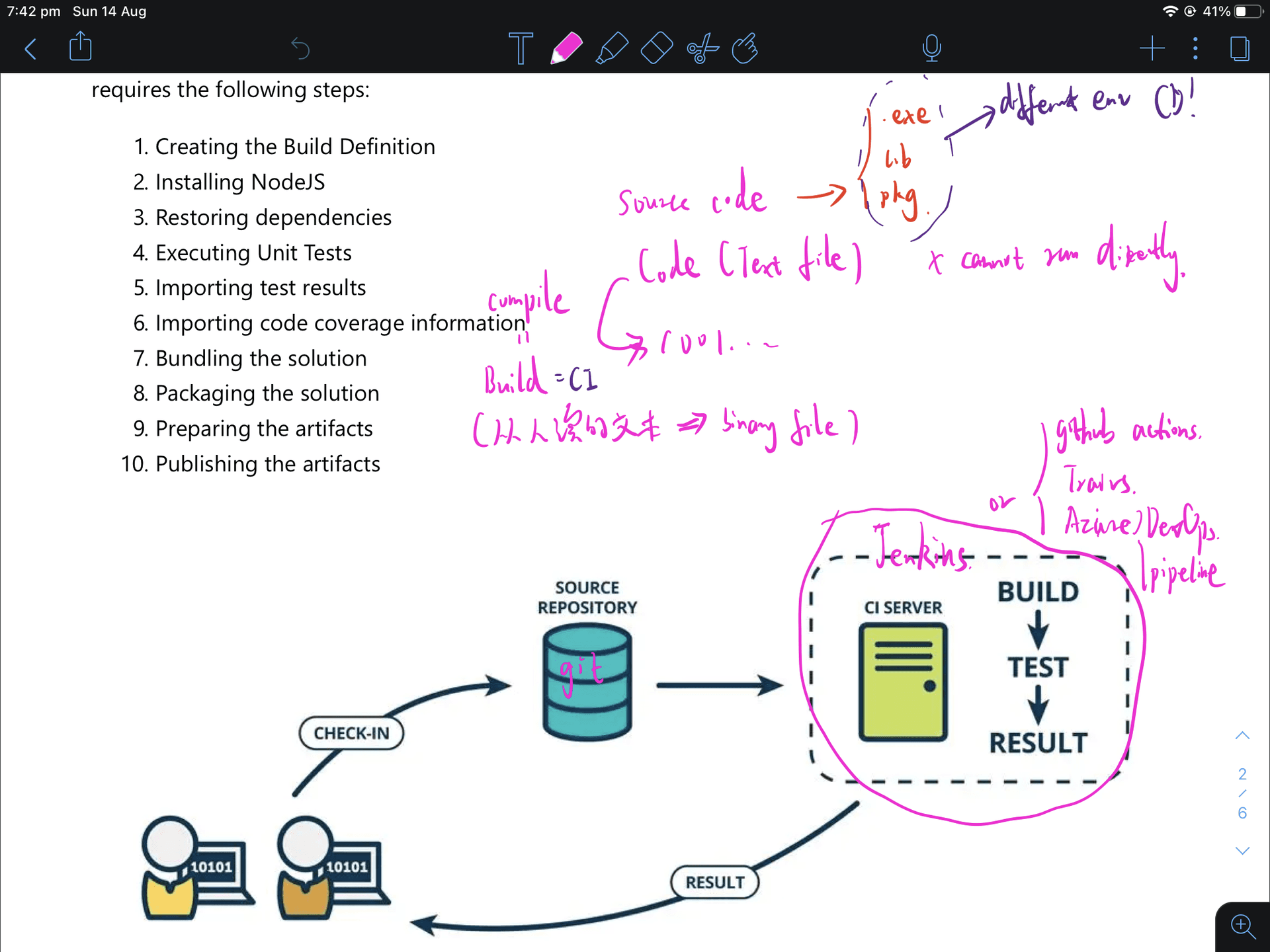
- an open-source application that allows CI&CD, which can be integrated with a number of testing and deployment technologies.
- improve efficiency: CD with a web project ⇒ web farm (web server farm), which can be checked easily from the dashboard (to check CD status).
- CI
- By automatically verifying the build using unit tests and packaging the solution for each new code changes are submitted
- compile == Build == CI (codes(source code/text file) to binary) ⇒ .exe, lib, pkg
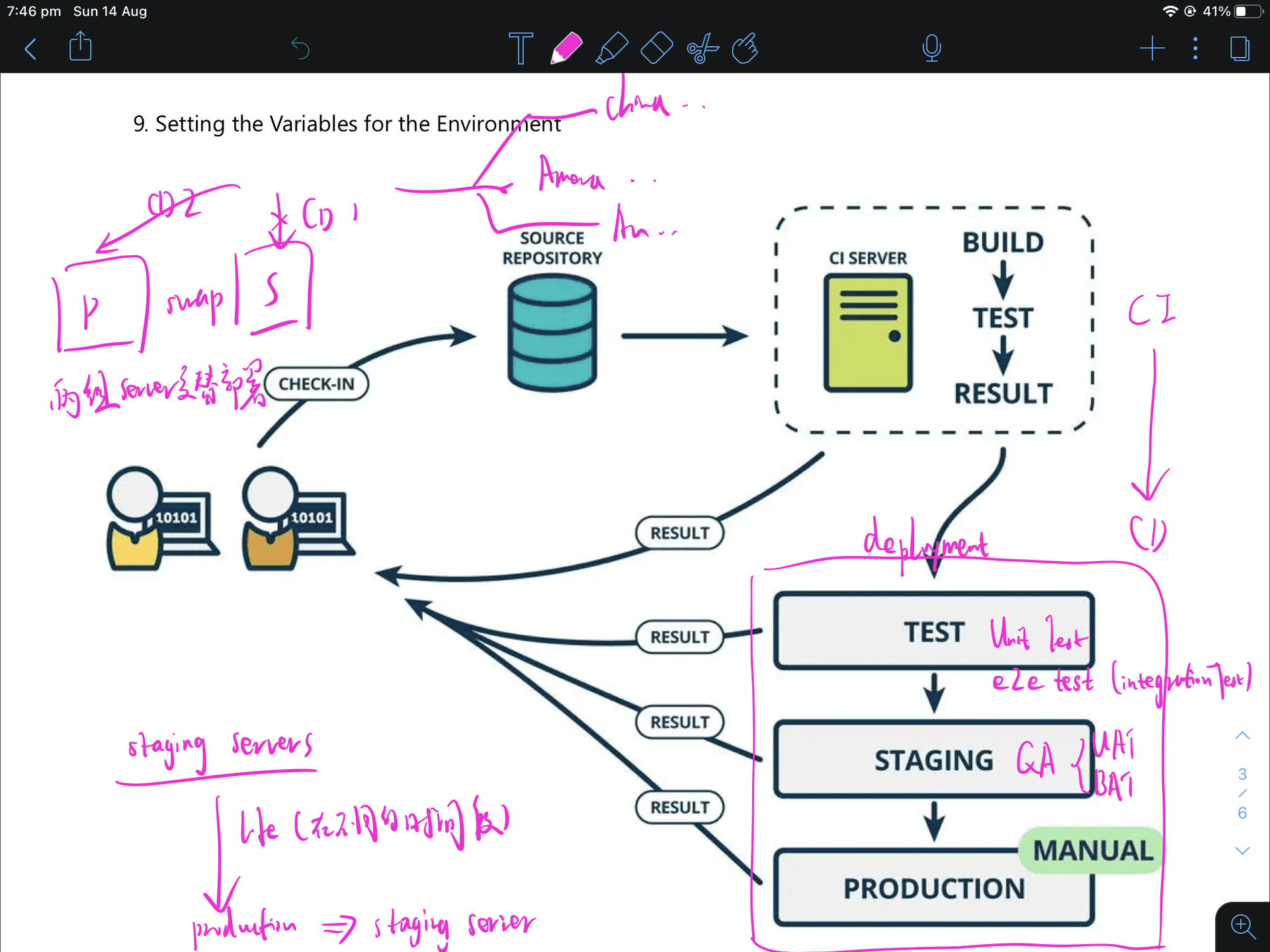
- CD
- takes executable files(validated code package) from the build process and deploys them into staging or production env.
- developers can track which deployments were successful or not and narrow down issues to specific package versions
- 两组 severs 从 staging 到 production 交替部署(见图), blue/green deployment https://blog.inedo.com/blue-green-deployment-best-practices 也可用 Jenkins 去调度其它云服务资源,如 AWS CodeBuild/CodeDeploy。个人觉得是一种资源补充吧 因为 M1 使用的是 ARM 架构精简指令集,运行 docker 大概是使用 Rosetta2 转译,机器运行 Jenkins 在 docker 中感觉奇慢无比,目测慢于 10 倍 Win
DevOps Jenkins&内网穿透 02
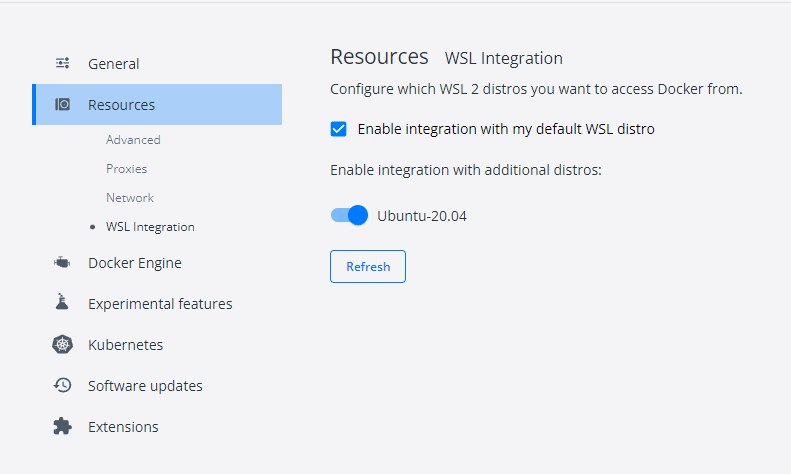
- install Jenkins locally
- In win, sudo service dock start : 以启动 ubuntu docker engine(可以关联 docker engine 到 ubuntu (入图 2)
- 运行 Jenkins container
- get admin password to finish build jenkins
- ngrok 内网穿透(反向代理)
- 访问 ngrok 官网,获得 auth-token
- 本地安装
- for win, 改权限 → 解压 → 配置 token → 开放 80 端口
- for mac, 可以使用 brew install —cast ngrok (没有自己去.bash_profile 配路径的烦恼),其余的和 win 一样
- copy 内网穿透地址到 Jenkins configuration → Jenkins URL
- 联动 Github with Jenkins
- add new item
- freestyle project
- with git + Repo URL with .git connection
- build triggers → Github hook trigger for GITcm polling
- braches to build 可以选择*/master or/and null mean all branches trigger
- 在 github 中添加 webhook → go to git repo
- payload URL 注意结尾一定要是 github-webhook. eg. http://XXXXngrok.io/github-webhook/
- just the push event(trigger situation)
- active (激活改 webhook)
win&ubuntu 用户需要在各种命令前加上 sudo
安装 ngrok 在 osx
https://gist.github.com/wosephjeber/aa174fb851dfe87e644e?permalink_comment_id=3621858
DevOps Azure Docker Jenkins 1
- create VM
- 在服务器中查看 connection
- 给端口 22, 80 和 433
- 给 ssd 64g,勾选同步删除 及 同步删除 public IP
- 开放 8080 端口 for demo
- ssh server → install Jenkins docker
- sudo apt update
- sudo apt install docker-compose
- sudo docker run XXX
- NS delegation from AWS to Azure - subdomain
- nslookup -type=NS shawnwong.click check DNS Name server
- add the domain name in Azure DNS (eg. sure.XXX.XXX)
- copy NS from Azure DNS to the domain server in NS (NS delegation)
- nslookup -type=NS nz.shawnwong.click check DNS Name server
- add a new record set in Azure DNS with type A and alias
- install nginx in Azure VM
- apt install nginx
- systemctl enable nginx (配置开机自动启动)
- add SSL
- modify nginx files
- restart nginx: sudo systemctl restart nginx
- systemctl status nginx 查看某一个服务的运行状态
坑:
- wsl 的 ubuntu 无法修改 win 文件的权限,编辑或创建
- 可直接拷贝文件到 linux 目录下 cp
- 直接修改/etc/wsl.conf 文件权限
DevOps with Private Github 2 & Nginx Config
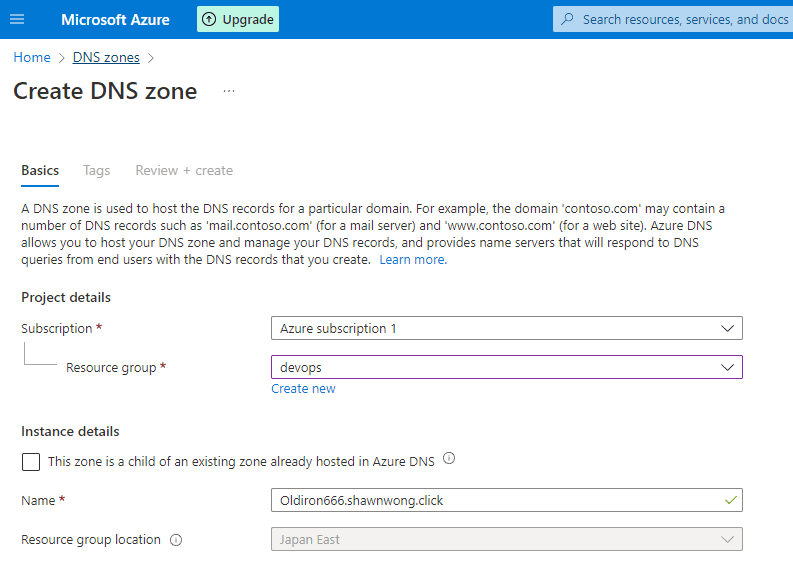
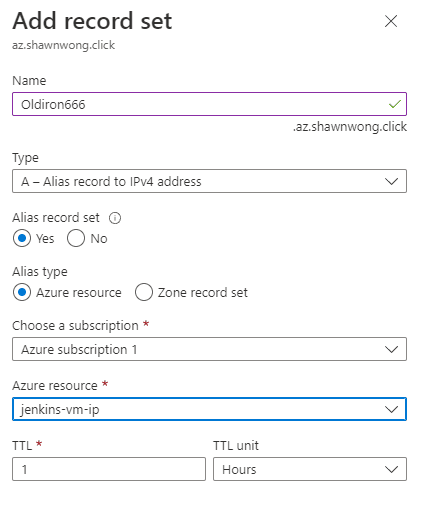
配置指定域名 DNS(from AWS to Azure)
- 在 Azure DNS 中创建, Name 可填写为 XXX.<urdomainname>
- copy NS name 到 AWS route53 delegation
- 创建 record set → 用 alias recoder set 可直接指向到 vm server 资源
- or 直接用 A 标签指向 public IP address
Install Nginx & add cert to Jenkins server:
- sudo apt install nginx
- sudo systemctl enable nginx: 开机自启动
- 添加证书
- sudo systemctl status nginx 查看某一个服务的运行状态
- sudo systemctl restart nginx 重启 nginx
Narrow way to add ssh public key
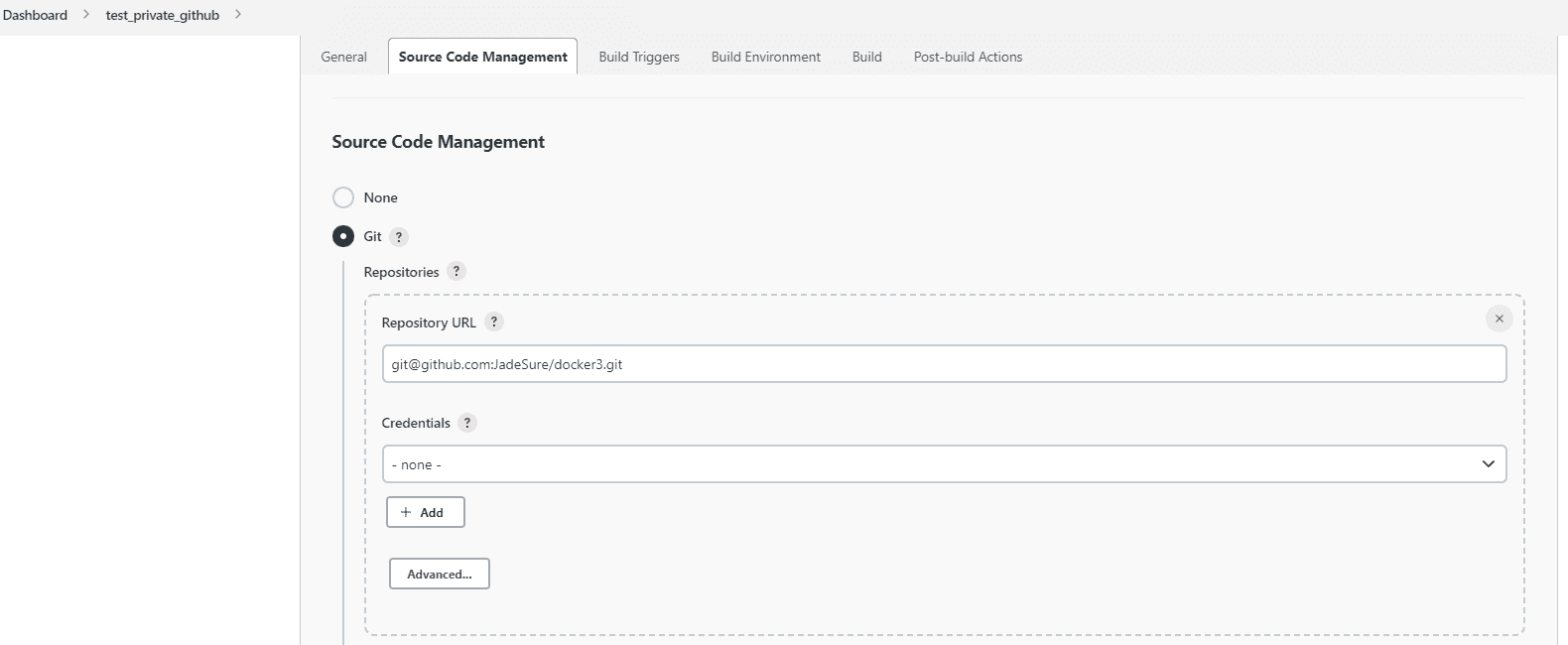
- add ssh key in specific GitHub repo → setting → deploy keys to let user only access this repo
爬坑指南:
- 如果是 docker 运行的 jenkins,添加.ssh 记得要在 docker 内添加(使用 sudo docker exec -it <cont_id> sh 进入 container 后,再使用 ssh-keygen)
- 不需要在 jenkins 中添加添加 confidential,即在 dashboard-<your-pipelineName>-source code management 中,credentials 选择 none
- 可 restart container with the command:sudo docker restart <Con_id>
- 修改 nginx 配置文件时,记得 comments 掉 404 指向
DevOps Jenkins Ocean Blue
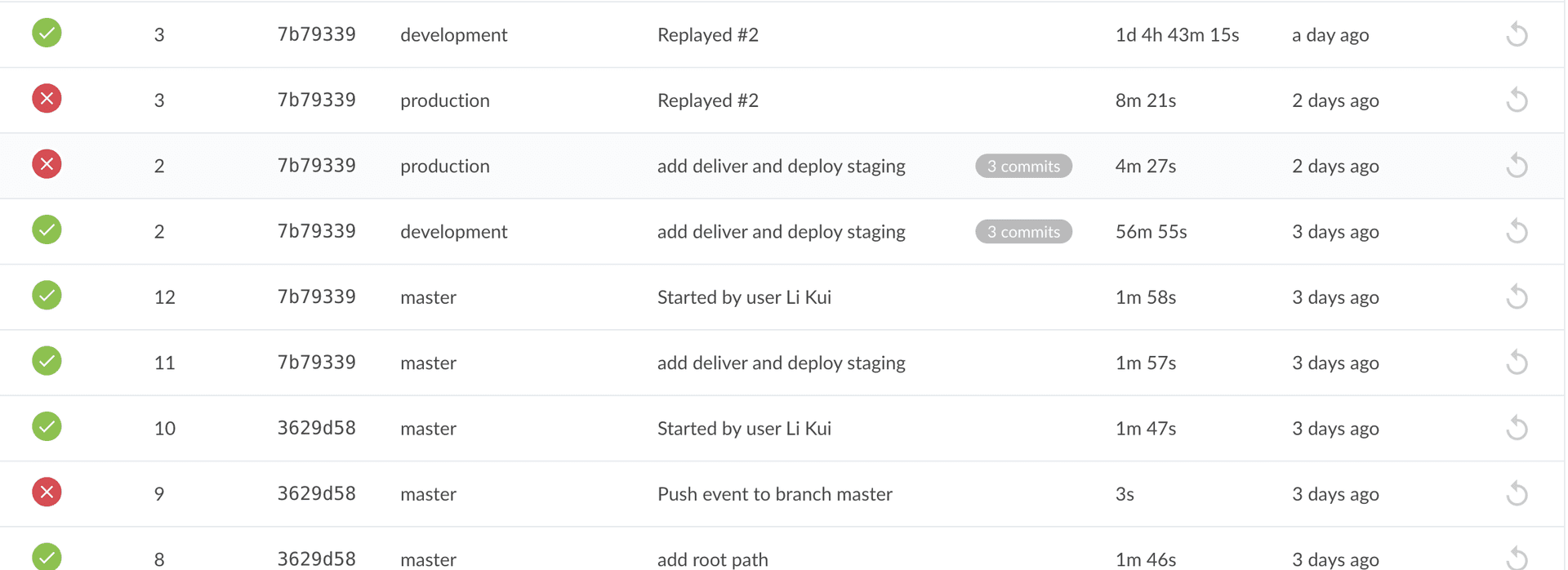
- 主要包括 CI 和 CD(content delivery)的 multibranch pipeline,未包括 content deployment
- content deployment 主要涉及一些生产环境的 data(用户信息,database),live workloads
- git push origin <new-branch> or git push origin HEAD 推送新的 branch 到 github 上
- git pull . master 把文件从 master pull 到当前的分支(自己自动同步了本地)
- Plugin 和 Docker Engine 的区别?
- 一个是使用 docker 的工具,一个是 docker 本身 —Arno
- Ocean Blue 使用流程
- 链接 github → github setting → developer setting → personal access tokens → 给予权限(user, write…)→ create a pipeline
- Install docker-engine in Linux
- which docker → 在这里面找到 docker engine 路径,然后添加到 global config
- config docker path in Jenkins and add Jenkins plugin with docker pipeline and docker plugin
- add HOME ’.’ in Jenkinsfile 在当前 user 的文件夹下去运行这些文件(/bin/sh),而不是 root 文件下(cd.. to root)
DevOps Jenkins master-nodes 联动
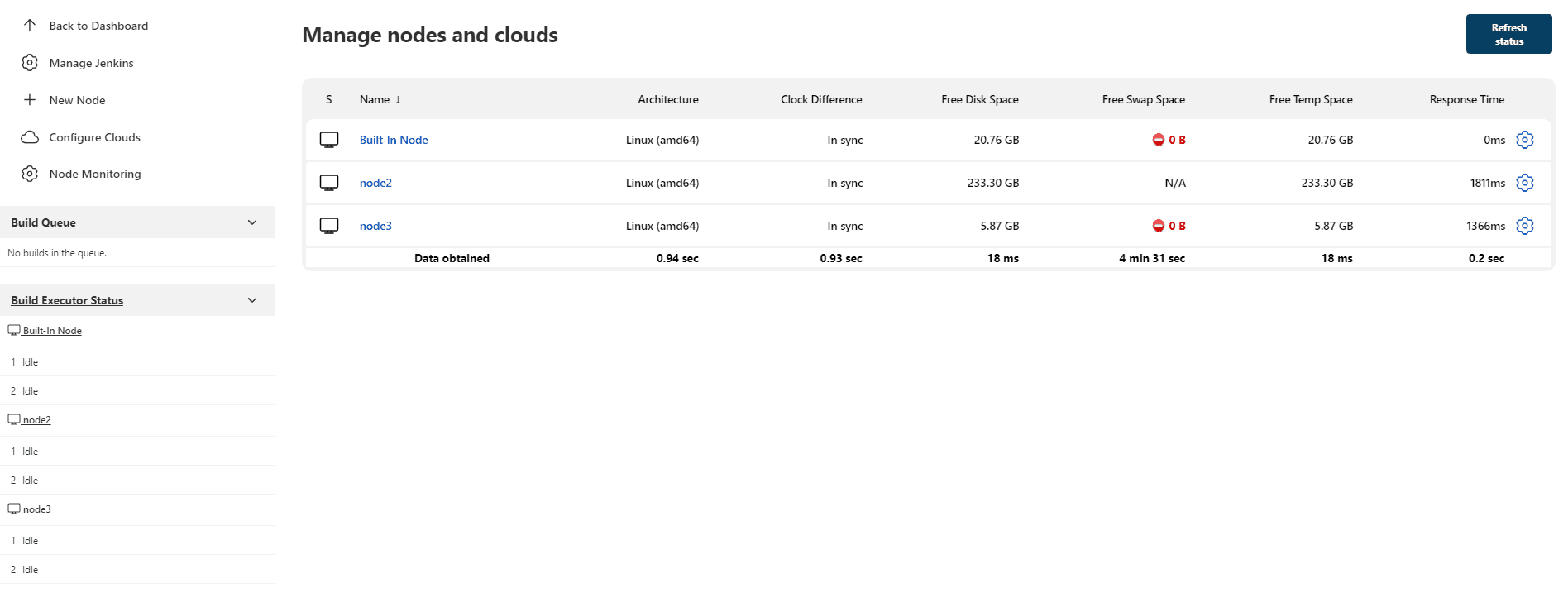
AZ-GCP-Local Jenkins
- 启动 AZ, GCP VM + local machine
- 添加 docker 环境
- 添加 JDK 11+ 环境
- 添加本地 node: manage Jenkins → manage nodes and clouds → add a new node
- 注意在 configure global security 中添加 fixed TCP port 5003
- wget jar 包到本地 machine
- 开放 inbound 5003 在 AZ VM
- 因为是 local,会 offline,选择 label 名字匹配的时候才启动
- 选择 launch agent by connecting it to the controllor (由 AZ VM 主动去 call local machine 去执行 task)
- 添加 GCP node
- 'visudo' 命令是用来编辑修改'/etc/sudoers' 文件,为普通用户配置'sudo' 权限的(修改 jenkins 到普通用户可操作, 使 Jenkins 在不输入密码的情况下可进行一些操作)jenkins ALL=NOPASSWD:ALL
- 尽可能多的使用该 node
- /var/lib/Jenkins 相当于 jenkins 这个用户, 跟 root/用户名类似
- 给 Jenkins 这个‘用户’生成 ssh key:/var/lib/jenkins/.ssh/id_rsa
- ssh-keyscan -H 34.129.185.248 >> /var/lib/jenkins/.ssh/known_hosts 添加 GCP node 主机到可信列表
- 添加 id_isa.pub key 到 gcp 中,方便无密码访问 echo ‘keyxxx’ >> ‘ssh-rsa public key’ to ~/.ssh/authorized_keys
- 添加 id_rsa private key 到 jenkins credential 中,完成和 gcp VM 的认证交互
Jenkinsfile Generator
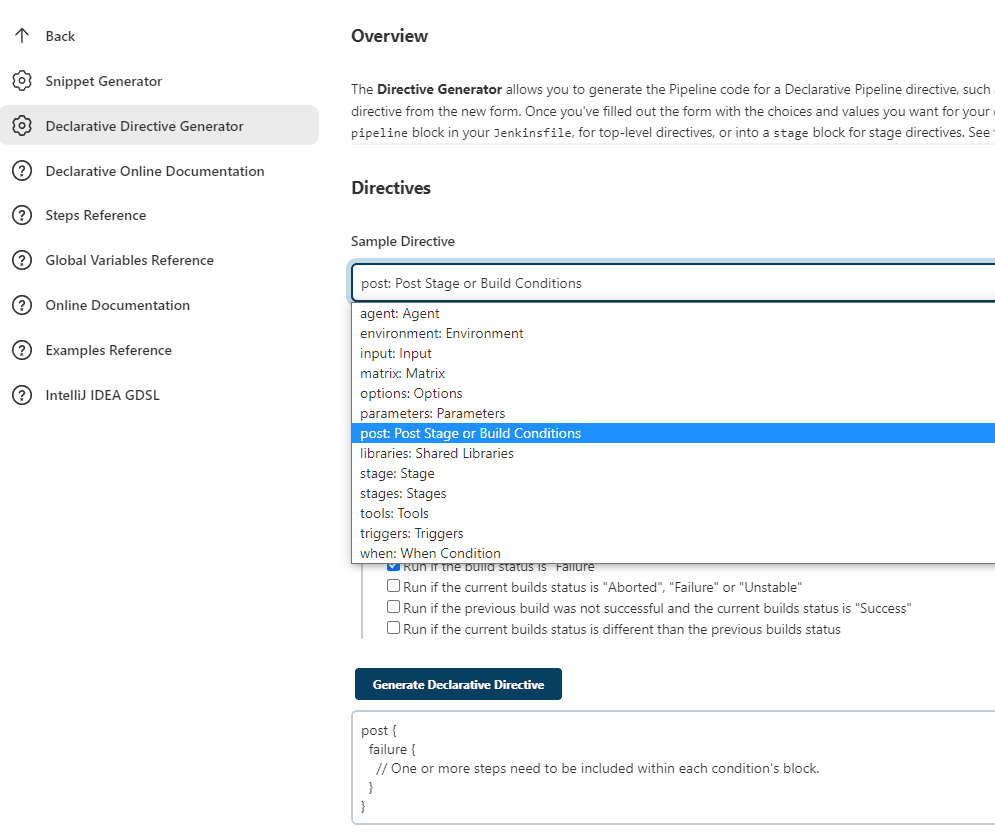
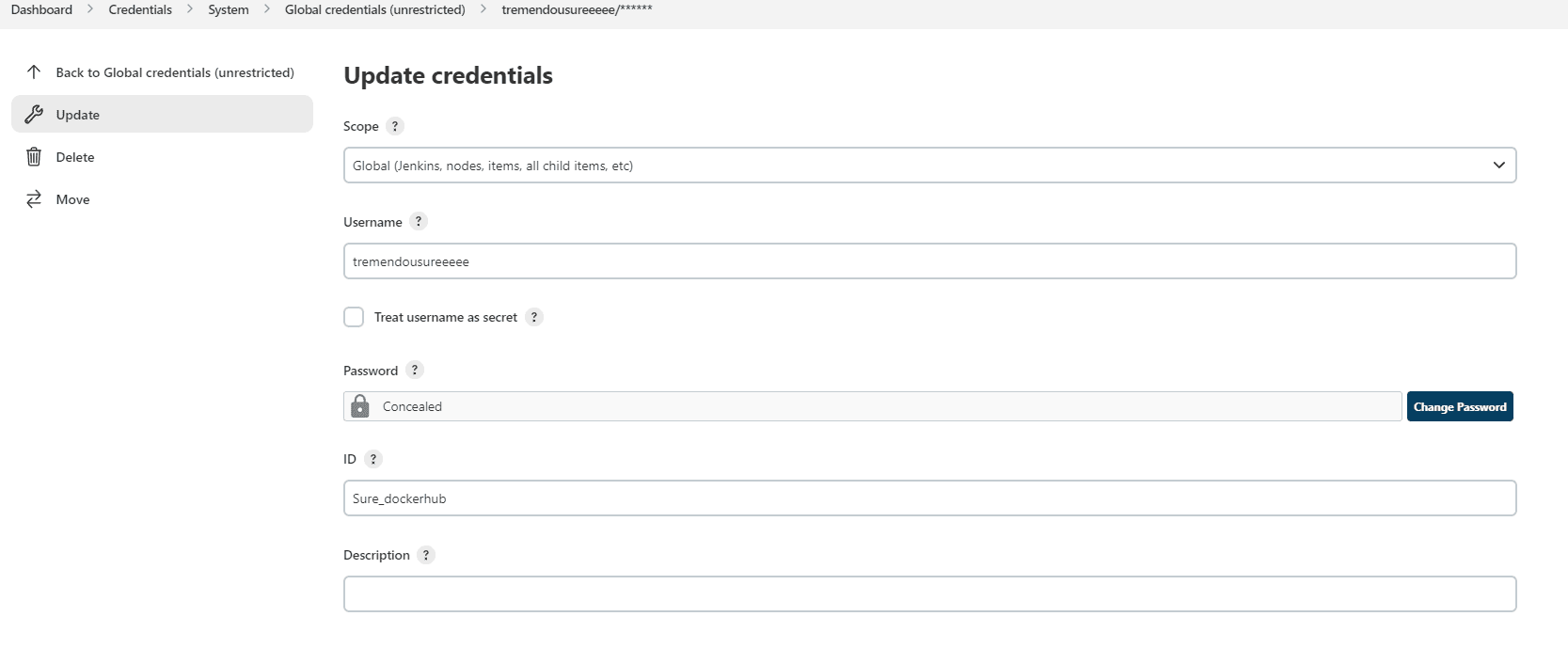
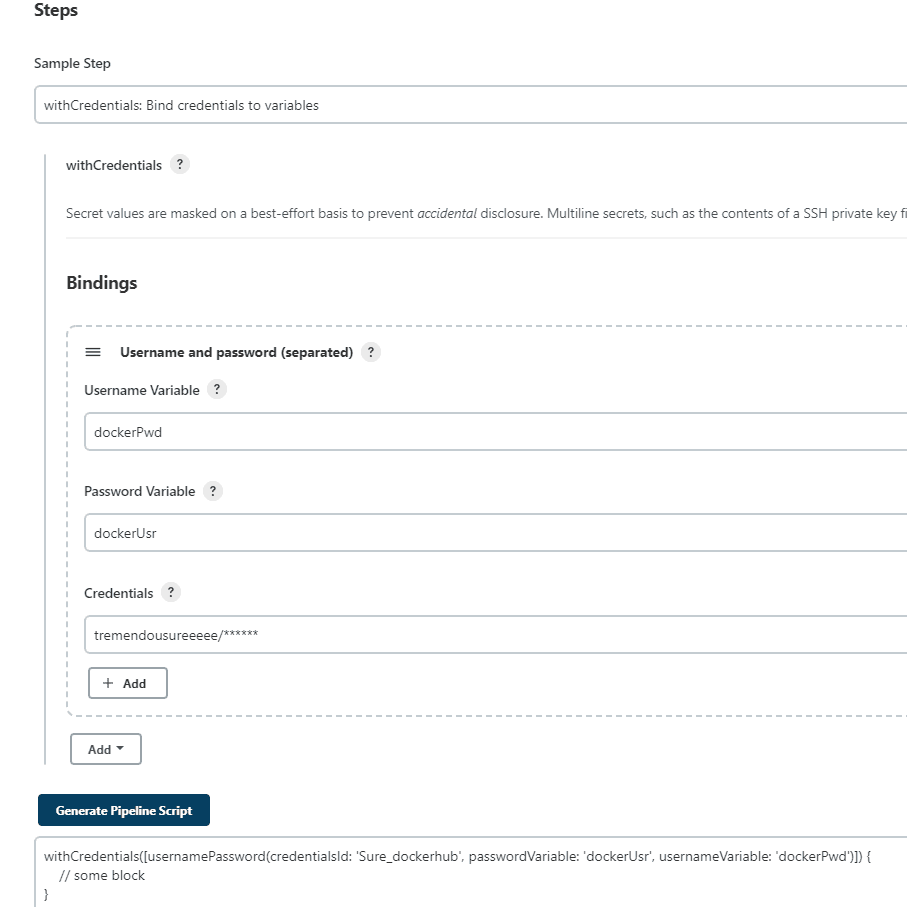
Jenkinsfile 可以用 Jenkins 自带的代码流程生成器去生成代码,其中包括 snippet generator 和 declarative directive generator.
- pipeline: code pipeline start
- agent
- any: any agent
- label: run on an agent matching a label
- docker: run inside a docker container
- dockerfile: build on an image matching a label
- stages: pipeline start point
- post: execute some logic after all stages are executed (可用于根据不同的执行情况做最后的内存处理)
- parameters
Snippet Generator
- cleanWs(): delete workspace when build done
- git: git credential
- timeout + input:
爬坑指南:
- 在 snippet generator 中生成 withCredentials,这里的选择 username 和 password(separate)的,然后链接的是自己在 jenkins 中设置的 username 和 password,同时,这里命名的 dockerPwd 在 jenkinsfile 中,会反向匹配,最终应用在命令行中,起到了一个密码保护的作用
- credentialsId 即是自己在 jenkins 中起的名字
- parameters 的话,会出现在 jenkins 中, BUILD WITH PARAMETER,对 pipeline 进行空参执行