K8s

DevOps K8s Overview 1
- K8s?
- managing containerized workloads and services;
- when u deploy k8s, u get a cluster.
- service? an abstract way to expose an application, 提供 IP(cluster IP), single DNS, port for a set of pods
- pods?
- the components of the application workload;
- the smallest deployable units of computing that you can create and manage in k8s;
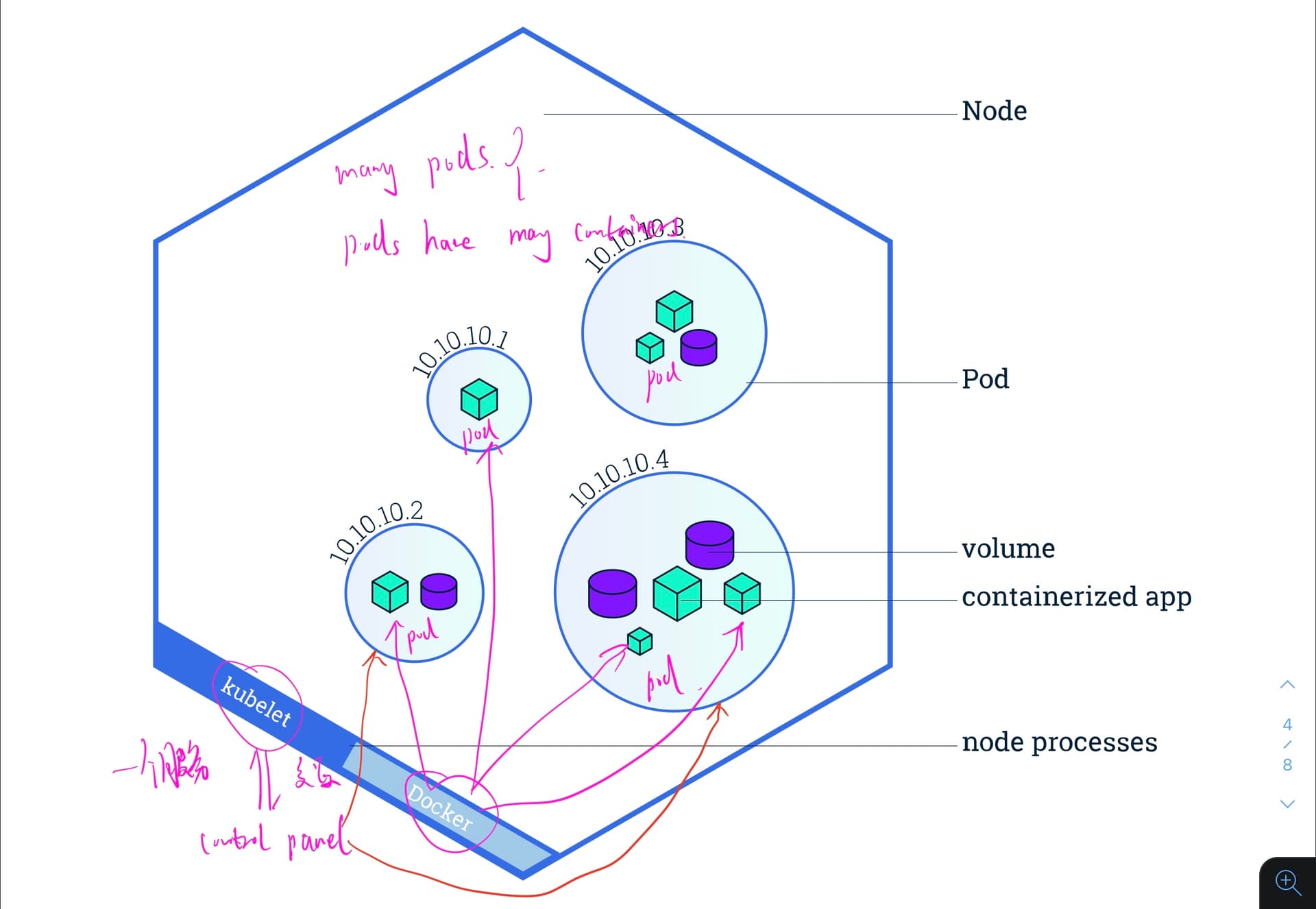
- a group of containers, share with namespaces, filesystem volumes and network resources.
- 在一个 specific LOGICAL HOST 中,没给 container relatively tightly coupled. (in a non-cloud context, the same physical or VM are executed on the same LOGICAL HOST.)
- Node? == VM machine; host the Pods that are the components of the application workload.
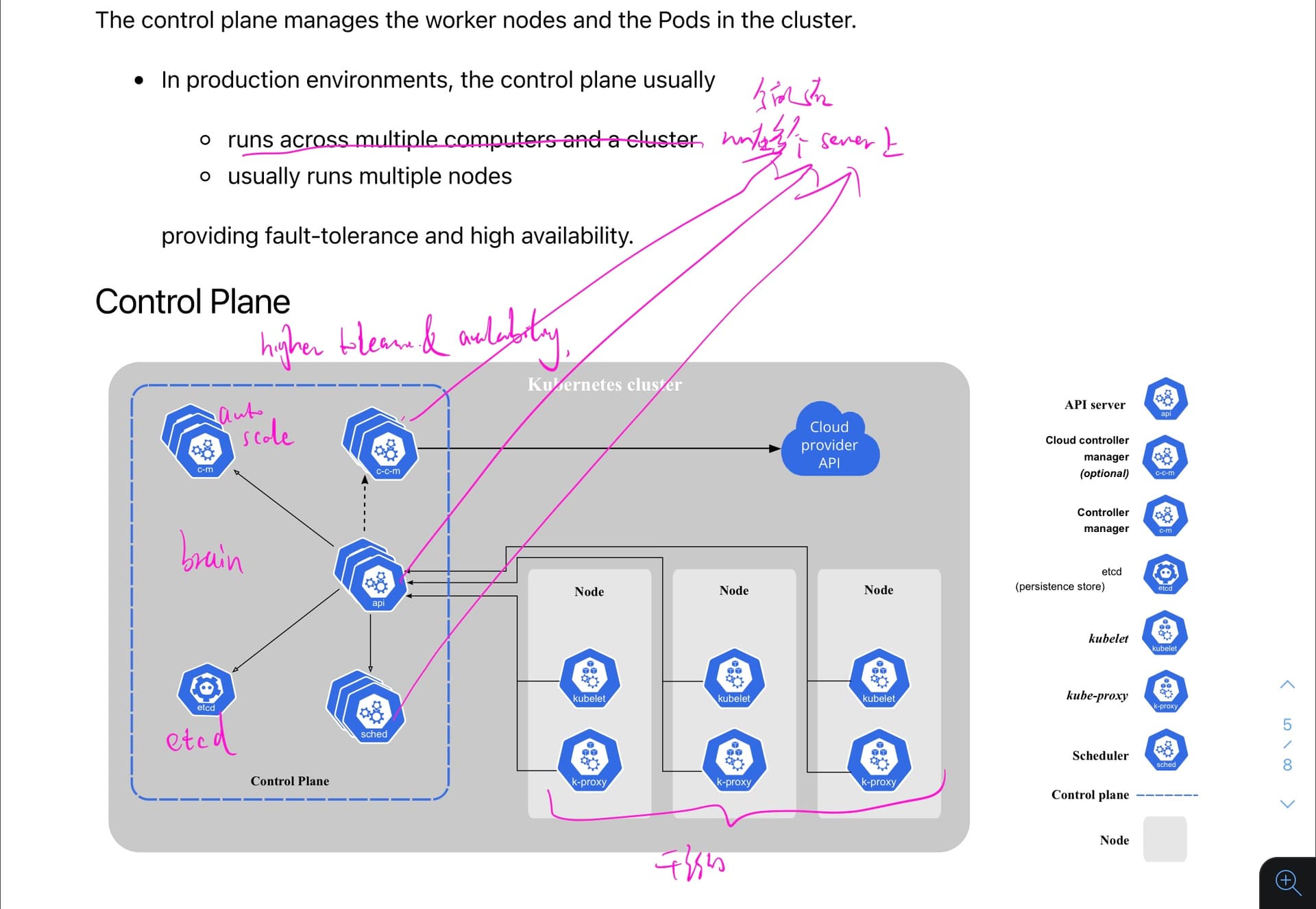
- Control panel? in prod, the control panel run across multiple computers.
- namespace? : resource name needs to be same (eg. env, prod…)
- targetport? a service that can map any incoming port to a target port.
DevOps K8s Overview 2
- Ingress controller: 用户使用 domain name 访问 ingress contoller,然后根据域名分配到不同的 services (音乐,流媒体播放,购物 XXXX)
- dirty job:
- Azure K8s service
- GCP k8s service
- AWS EKS
- control plan: Azure Kubernetes service cluster (auto-scaling)
- Cosmos DB: AZ NoSQL DB
- Grafana: visualize logs(metrics), grab data from azure data source 估计是从 nosql 中抓 log 信息,之后会详细讲
- relationship
- 1 k8s cluster has many Node(VM) (fault tolerance and high availability)
- 1 service has many pods.
- 1 Node has at least one Pod (The worker nodes host the Pods )
- 1 Pod has at least one container
DevOps K8s Deep 1

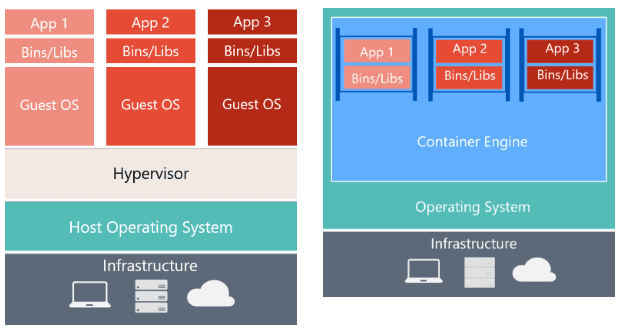
K8s 的设计,更强大,更灵活,更 robust;basic info 参考之前的博文
docker flaws: all docker in one EC2 -> single point failure.
Control panel == orchestrator
K8s provide
- Service discovery and load balance:k8s can find where the Service based on requirements and k8s can expose a container to be a DNS
- Storage orchestration: 本地存储和云存储
- automated rollouts and rollback:多个 contianer 同时回滚代码,配置
- automatic bin packing:保证 each server runs the max capacity => open new or scale down.(一般控制每个 node cpu<60%),也可自定义分配
- Self-healing: 检测 health,自动更换坏的,确保完全 work 后才 release
- secret and config management: env variable and password centralised be organised.
Control panel:
- 决定哪些 pod 放到哪些 node 中,最大化利用资源
- 生成 pods
- 专门运行在一个 node 上
- Kube-apiserver: 暴露 k8s API,各个 service 之间交互用
- etcd: 存 secert & config
- kube-scheduler: assign new pod to available node, 更好的管理 space
- Kube-controller-manager: logic handler
- Cloud-controller-manger: 跟各个云服务 api 对接在 cluster level
DevOps K8s Deep 2
Node:
- == EC2
- Node 是被 control panel 所管理的
- 干活的,也叫做 worker node
- 至少一个 pods
- 至少一个 kubelet: 大脑和干活的之间的一个中介
- 至少一个 container runtime:负责 running containers(implement container runtime interface 的都行)
- Kube-proxy: network proxy 网管,负责管理 pod 之间的 IP 通信
- 这里的 docker 负责管理每个 pod 的 container
K8s cluster:
- 至少有一个 worker node
- 里面的服务运行在多个 server 上(eg. Cm, ccm, api…),控制多个 nodes
Swarm:使用 docker CLI 生成 swarm,理解成轻量级,docker 原生 k8s
- swarm == k8s cluster
- Kind: a tool for running local Kubernetes clusters using Docker container “nodes”. 主要用来测试 k8s 本身
- namespace == isolated logical project
- ingress controller == loader balancer
Swram 爬坑指南:
- 版本,版本,版本!尽量和老师的版本一致,不然坑很多
- k8s 用 1.21 的话,记得在 demojob 中 apiVersion: batch/v1beta1,否则使用 apiVersion: batch/v1 (我是升级到最新版本的 k8s 1.25 操作成功的)
- 同理,kubectl -n create token admin-user 那里,如果使用旧版本的话,会报错命令不存在,无法直接生成 admin user token
K8S basic components 1
.png&w=1920&q=75)
.png&w=1920&q=75)
.png&w=1920&q=75)
.png&w=1920&q=75)
- k8s benefits: high availability, high scalability and disaster recovery
- Pods
- abstraction over container
- each pod gets its own private IP address
- smallest unit
- service:
- provide the permanent IP address
- lifecycle of pod and service not connected; so when one fails, another one can connect directly quickly
- load balancer; send traffic to more pods
- internal service vs external service(public ip address with port in the node level): private IP vs public IP
- Ingress: a proxy(provides Public IP address) for external service → connect to service
- ConfigMap: external configuration of your application (the Pod actually gets the data that ConfigMap contains) such as url link (ENV)
- secret: used to store secret data without a plain text (ENV)
- volumes: consist save data (because K8s doesn't manage data persistence!)
- deployment:
- a blueprint for my-app pods (specify how many replicas and u can scale up or down)
- is a layer of abstraction on top of pods
- deployment for stateless Apps vs StatefulSet for stateful apps or DB
K8s Basic components 2
.png&w=1920&q=75)
.png&w=1920&q=75)
- one node(slave nodes) must have: container runtime, kubelet, Kube proxy
- kubelet: interacts with both container and node; starting a pod with a container inside and assign the resource from node to the container (CPU, RAM)
- Kube Proxy: forwarding requests from services to pods (avoid network overhead of sending the request to another machine)
- Master nodes(control plane):
- API server: like a cluster gateway which gets the initial request of any UPDATE or QUERY; acts as a gatekeeper for authentication.
- scheduler: schedule new pod → api server → scheduler → where to put the pod (像行李打包,根据行李的 size 塞给不同的集装箱一样); scheduler just decides on which Node new Pod should be scheduled. (具体由 kubelet 在每个 node 中去执行)
- controller management: detect any pods die in any nodes and reschedule those pods as soon as possible; (detects cluster state changes); controller manager → scheduler → kubelet; ensures proper STATE of cluster components.
- etcd: key-value store of a cluster state; cluster brain! 专门记录状态的;this storage cross all the master replica nodes. 一般一个小型 cluster 有 2 个 master,3 个 slavor; master 需要较少的性能,slavor 需要较多的性能; master 和 slaveor 可以根据需求被无限扩展
- Slavor nodes:
- container runtime engine: Docker, containerd, CRI-O, frakti…
- kubelet: it is an agent that runs on each node in the cluster 确保每个运行没问题,并上报给 master,scheduler 也会通过这个来生成 pod
- kube-proxy(network proxy): allows each node communicate with each other(allow network communications)
K8s Services
.png&w=1920&q=75)
.png&w=1920&q=75)
.png&w=1920&q=75)
.png&w=1920&q=75)
- service will link it by selectors with each pod
- k8s creates an Endpoint object, which is the same name as Service and keep track of, which pods are the members/endpoints of the Service
- Headless service: only communicate with 1 specific Pod directly (ClusterIP: None)
- load balancer service is an extension of the NodePort Service
- NodePort Service is an extension of ClusterIP service
K8s 常用 cmd imperative
- kubectl edit pod redix: 修改已经创建的 pod 的 yaml 配置,进而修改构建 pod 的 image
- kubectl run <tagName,自己起名字> —image=<docker image name> eg. kubectl run redis —image=redis 含义:create a new pod
- kubectl delete pods <tagName> 删除某个 pod
- kubectl get pods -o wide (get 一堆 pods,相当于 output,wide)
- kubectl describe pod <tagName>
- kubectl get pods
- kubectl run redis —images=redis123 —dry-run=client -o yaml > redis.yaml 输出配置到 yaml 文件
- kubectl apply -f <filename> 应用文件去生成 pods
- kubectl create -f <filename> 生成
- kubectl get replicaset: get command to see a list of replica sets created
- kubectl delete replicaset <tagName>
- kubectl replace -f replicaset <fileName> 替换配置
- kubectl scale —replicas=6 -f <fileName>
- kubectl edit replicaset myapp-replicaset 修改 replicaset 设置
- kubectl scale rs new-replica-set —replicas=2 rs 是 replicaset 的缩写
- kubectl get all 获得全部的详细信息,包括 deployment, replicas and pods.
Deployment strategy: create, get, update, status, rollback
.png&w=1920&q=75)
- kubectl rollout undo deployment/myapp-deployment 回滚部署的代码
— record=true 会记录命令的执行历史记录
- kubectl set image deployment myapp-deployment nginx=nginx:1.18 更新 image
Service
- NodePort: 让外部能够访问内部的,分 target port 和 port, nodeport
.png&w=1920&q=75)
kubectl get pods,svc 查看两个的在运行的服务
debugging:
kubectl logs {pod-name}
kubectl exec -it <pod name> —bin/bash
kubectl get deployment neinx-deployment nginx-deployment -o yaml > nginx-deployment-result.yaml 将配置信息拷贝到 yaml 文件中
'kubectl delete --all deployments --namespace=foo' 删除全部的 deployment, service XXXX
启动 type = loadbalancer 的 service 时,用 minikube service mongo-express-service 去暴露 external IP address
kubectl create namespace uat-petlover
Volume
.png&w=1920&q=75)
.png&w=1920&q=75)
.png&w=1920&q=75)
- persist volume PV: not in any namespace. they’re just available to the whole cluster to all the namespaces.
- persistent volume claim PVC: claims must exist in the same namespace as the pod using the claim
- storage class SC: provisions persistent volumes dynamically: when persistent volume claims it, SC generate directly
- configure and secret is local volumes(not in any ns) and it is not created via PV and PVC, which is managed by K8s
使用流程:
- 老版本的:admins configure storage(Manually) ⇒ create PV ⇒ developer claim PV using PVC
- 新版本 developer claim PV using PVC ⇒ Storage class SC allocate resources (PV) to developer
.png&w=1920&q=75)
.png&w=1920&q=75)
Helm - Package Manager of K8s
.png&w=1920&q=75)
.png&w=1920&q=75)
.png&w=1920&q=75)
.png&w=1920&q=75)
- Helm Charts:
- bundle of Yaml files
- create your own helm charts with helm
- push them to helm repo
- use others ones
- helm hub, helm repo, helm pages
- templating engine
- define a common blueprint
- dynamic values are replaced by placeholders
- dev - staging - prod
- release management: state management in triller server(V2, V3 now is not exist)
- Helm command:
- 本地添加 helm repo:helm repo add bitnami https://charts.bitnamiXXXXXX
- 根据你添加的 repo 搜素需要的 application: helm search repo jenkins
- pull 下来一个 helm chart:helm pull bitnami/<image_name> —untar=true
- 安装 helm chart:helm install <give-a-name> bitnami/nginx
- 删除 helm chart 所部署在 node 中的 service:helm delete <give-a-name> (注意,此时,pod 中的 service 也会一并被删除)
Namespaces in system
.png&w=1920&q=75)
- Arch knowledge:
- deployment manage a replica set
- replica set manage all replica of its pod
- the pod is an abstraction of a container
- k8s namespaces
- a virtual cluster inside a cluster
- kubernetes-dashboard(namespace) only with minikube
- kube-system: system processes; master and kubectl processes; do not create or modify in kube-system
- kube-public: publicly accessible data; a configmap, which contains cluster information
- kube-node-lease: heartbeats of nodes; each node has associated lease object in namespace; determines the availibilitiy of a node
- default: resources you create are located here
- kubectl create namespace my-namespace
- create a namespace with a config file
- when to use multi namespace?
- resources grouped: db, monitoring, logging, elastic stack, nginx-ingress
- many teams with same application: each team working their own without influence each other
- resource sharing: staging and development
- blue/green deployment (reuse those components in both envs)
- resource limits; limited env; limit hardware resource (Each NS must define own configMap) (service can across NS)
- vol and node can not be inside the namespace(shared with others)
- add - -namespace=my-namespace to isolate each namespace
- 切换 ns
- kubectl config set-context $(kubectl config current-context) --namespace=test-ns 切换到 test-ns
- kubectl config set-context $(kubectl config current-context) --namespace=default 切换回 default
.png&w=1920&q=75)
.png&w=1920&q=75)
.png&w=1920&q=75)
- kube-node-lease: improves the performance of our node heartbeats (benefit for cluster autoscaling)
- kube-public: readable for cluster
- kube-system:
- kube-dns
- kube-proxy
- ebs-csi-node
Probes
- liveness Probe
- kubelet uses liveness probes to know when to restart a container
- liveness probes could catch a deadlock, restart container " livenessProbe: exec: command: - /bin/sh - -c - nc -z localhost 8095 initialDelaySeconds: 60 periodSeconds: 10 " 'nc -z' will check if someone is listening on the other side
- readiness probe
- to know when a container is ready to accept traffic
- when is not ready, rm from load balancers based on this readiness probe signal
- startup probe:
- when a container application has started
- it will disable liveness & readiness checks first to avoid restarting container repeatly
OIDC and IRSA with IAM identity federation
- To enable and use AWS IAM roles for Kubernetes service accounts on our EKS cluster, we must create & associate OIDC identity provider. Allow it to make calls to AWS APIs on your behalf.
- IRSA: IAM role service account (可以 associate 一个 IAM role 和一个 k8s service acount),这样,这个 service account 就可以提供 aws permissions to any 使用这个 service account 的 pods
- To create and associate an OIDC identity provider with our EKS cluster, we need to follow these steps:
- Create an IAM OIDC provider in the IAM console.
- Associate the IAM OIDC provider with our EKS cluster.
- Create an IAM policy that allows our Kubernetes service account to assume the IAM role.
- Create a Kubernetes service account that uses the IAM role.
- Verify that the Kubernetes service account can assume the IAM role by running a test pod.
- OpenID connect provider: EKS 作为一个 provider,可以使用 aws EKS open id connect provider to access AWS services using the IAM identity federation https://docs.aws.amazon.com/eks/latest/userguide/iam-roles-for-service-accounts.html
.png&w=1920&q=75)